
Embrava Desk Sign – Smart Desk Booking Display for Hybrid Workplaces


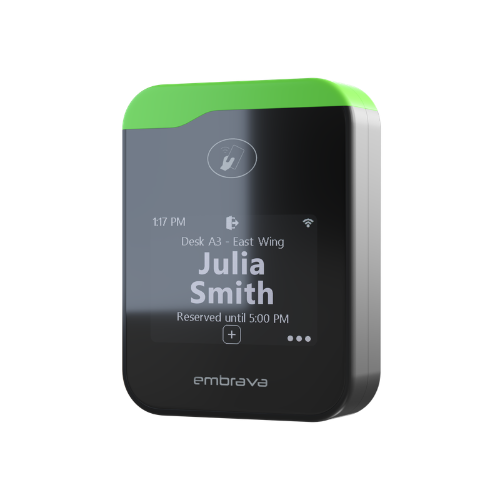
The Embrava Desk Sign is a network-connected desk reservation and occupancy display designed for hot-desking, office hoteling, and hybrid workplace environments. Mounted directly on individual desks, it allows employees to reserve, check in, and release workspaces using RFID badges, smartphones, QR codes, or touchscreen interaction.
Product Overview
Desk Sign transforms a standard desk into a smart, bookable workspace.
Employees can:
- Claim an available desk instantly
- Check into pre-booked desks
- View reservation status
- Hold a workspace while temporarily away
- Release desks for others when finished
The system synchronizes with workplace management and desk-booking platforms, ensuring that the physical desk, floor plan, and booking software remain aligned.
Key Features
| Feature | Specification |
|---|---|
| Display | 2.8″ LCD Touchscreen |
| Resolution | 320 × 240 |
| Connectivity | Wi-Fi 802.11 b/g/n, Ethernet |
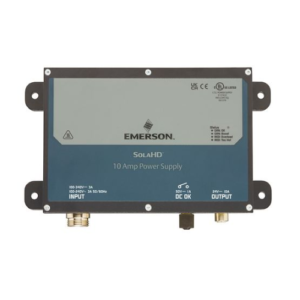
| Power | USB-C or PoE (802.3af) |
| Authentication | RFID, NFC, QR, Touchscreen |
| RFID Support | 13.56 MHz & 125 kHz |
| LED Status Light | 256-color customizable LED bar |
| Audio Alerts | 12 selectable tones |
| Mounting Options | Adhesive, Magnetic, Weighted Base |
How It Works
1. Walk Up
An employee approaches an available desk.
Authentication options include:
- RFID employee badge
- NFC-enabled smartphone
- QR code
- Touchscreen reservation
2. Claim the Desk
The display immediately shows:
- User identity
- Booking status
- Reservation duration
- Auto-release timing
No additional mobile app is required.
3. Workspace Hold
The desk remains assigned while the employee:
- Attends meetings
- Takes breaks
- Visits other office areas
4. Release
When finished, the user checks out and the desk becomes available for the next employee.
All booking systems update automatically.
Authentication Methods

Desk Sign supports multiple workplace authentication methods:
RFID Badge
- 13.56 MHz cards
- 125 kHz cards
- Existing access control badges
NFC Mobile Authentication
- Android devices
- iPhone devices
- Mobile workplace credentials
QR Code
- Reservation verification
- Mobile-assisted check-in
Touchscreen
- Anonymous walk-up reservations
- Quick desk assignment
Status Indicators
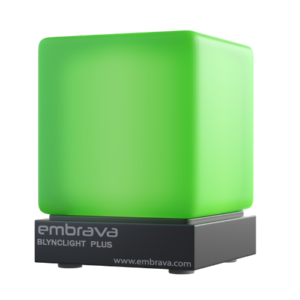
The device provides instant visual feedback using a customizable LED light bar.
| Status | Meaning |
|---|---|
| Available | Desk is free |
| Reserved | Future booking exists |
| In Use | Occupied and checked in |
The LED bar supports 256 colors, allowing organizations to match corporate branding or workplace zoning strategies.
Workplace Benefits
For Employees
Simplified Desk Finding
Employees can immediately identify:
- Available desks
- Reserved workspaces
- Occupied locations
without consulting floor maps or booking apps.
Reduced Workplace Uncertainty
The display provides clear ownership and reservation status, reducing:
- Desk conflicts
- Workspace confusion
- Time spent searching for seating
Easy Adoption
Users interact through familiar methods such as badges or smartphone taps, minimizing training requirements.
For Organizations
Improved Utilization Analytics
Desk Sign captures actual occupancy behavior rather than only reservation intent.
Organizations gain visibility into:
- Real desk usage
- Peak occupancy periods
- Workspace demand
- Neighborhood utilization trends
Higher Booking Compliance
Physical hardware encourages employees to actively check in and out, improving the accuracy of workplace data.
Consistent Employee Experience
The same interface can be deployed across:
- Headquarters
- Regional offices
- Coworking environments
- Satellite campuses
Platform Integrations
Desk Sign integrates with major workplace and space-management platforms, including:
- Microsoft Places
- ServiceNow
- OfficeSpace
- Envoy
- Robin
- Appspace
- IBM TRIRIGA
- Skedda
- Zoom
This allows organizations to maintain existing workplace technology investments without deploying additional middleware.
Mounting Options
Adhesive Mount
- 3M industrial adhesive
- No drilling required
- Suitable for most desks
Magnetic Mount
- Easy removal and relocation
- Ideal for flexible seating areas
Weighted Base
- Freestanding deployment
- Suitable for pilot projects and executive offices
Desk Sign vs Room Sign
| Feature | Desk Sign | Room Sign |
|---|---|---|
| Primary Purpose | Desk Reservation | Meeting Room Scheduling |
| Screen Size | 2.8″ | 10.1″ |
| User Capacity | Individual Employee | Multiple Meeting Participants |
| Mounting Location | Desk Surface | Outside Meeting Rooms |
| Walk-Up Booking | Yes | Yes |
| RFID/NFC Support | Yes | Yes |
| Utilization Analytics | Desk Usage | Room Usage |
Ideal Applications
The Embrava Desk Sign is particularly well suited for:
- Hybrid workplaces
- Hot-desking environments
- Corporate headquarters
- Flexible seating offices
- Coworking facilities
- Enterprise campuses
- Government workplaces
- Shared project spaces
Its combination of desk reservation, occupancy verification, workplace analytics, and seamless platform integration makes it a practical solution for organizations seeking to improve workspace utilization and employee experience in flexible office environments.