
Find your Mastery
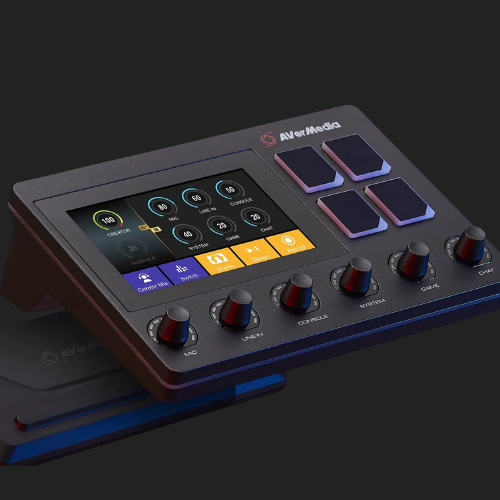
With a 6 track audio mixer and a fully customizable control panel, the Live Streamer AX310 will ensure you have full control over the live creation process. Be more productive, create more efficiently, master your content.

Your most important Tracks, Mixed.
Your voice, alerts, music, even game sound are a huge part of your content. Controlling and monitoring all 6 tracks withe ease and in real-time.

Dual independent audio mixes
Keep your audio levels separate from your audience. With Dual Mix you and your stream can have different audio experiences, allowing each to focus on what’s most important.

Creator Central.
The Creator Central app will have your AX310 customized for your needs in no time. Specially designed with content creators in mind, simply drag and drop widgets, add hotkeys, tune your mic, and more. Mastering your stream is only a few clicks away.

Ever-Evolving Functionality
With our ever-growing list of widgets and partners, expand your controls to every aspect of your stream and beyond. Explore the Creator Central Widget store to download the widgets for your every need.

Perfect for Tubing!
Share your game stream with you at its center as your very own Tube character. Live Streamer AX310 brings all your important Tubing controls to your fingertips with the support for Tube Studio, Voice mod and our very own Cam Engine Tuber Edition.
Trigger a custom action, change your model, switch between different voices, all at the touch of a button. The Live Streamer AX310 is the command center of your Tube Stream!
*The Tube Studio Widget is community developed and maintained by @Cazzar, a well-recognized developer in the Tube Community


Profiles for Easy Switching
Live Streamer AX310 is not only for streamers but also for every creator. Whether you are a Photographer, Music Producer, Game Streamer or Tuber, AX310 have all the controls you need.
With the new multi-profile system, you can easily download the preset profiles for Pro Tools, Lightroom and many more and switch between them in an instant to easily multitask.

Ongoing development
Creator Central integrates widely used streaming and content creation software. With Aver Media constantly working with other companies and community developers in expanding supported apps, you can be sure that your AX310 will only keep getting better and better!
RGB, Period.

How to setup your AX310
🎛️ Aver Media Live Streamer AX310
Find Your Mastery. Create Like a Pro.
Take full control of your live production with the Live Streamer AX310, an advanced 6-track audio mixer and customizable control panel designed for creators who demand precision and flexibility. Whether you’re streaming, producing music, or creating digital content, the AX310 gives you the power to master every aspect of your performance.
🔊 Your Tracks, Perfectly Mixed
Manage your voice, music, alerts, and game audio effortlessly with six independent tracks, all adjustable in real-time. Enjoy crystal-clear sound and total creative control, ensuring your audience always hears what matters most.
🎚️ Dual Independent Audio Mixes
Keep your personal and audience audio separate with Dual Mix. This lets you monitor and adjust your mix independently, giving both you and your viewers the ideal listening experience.
🧩 Creator Central – Your Creative Command Hub
Customize your AX310 easily using the Creator Central app.
- Drag-and-drop widgets
- Assign hotkeys
- Tune your microphone
- Adjust every setting in seconds
Master your stream in just a few clicks.
🛍️ Ever-Evolving Widget Store
Expand your creativity with a growing library of widgets and integrations. Download tools and controls tailored for your content — from streaming utilities to production shortcuts — all in one place.
🧑🎤 Perfect for VTubing
Transform your stream into a dynamic VTuber experience. With VTube Studio, Voicemod, and CamEngine VTuber Edition support, you can trigger actions, switch avatars, or change voices with a single tap.
VTube Studio Widget developed by @Cazzar from the VTuber community.
⚙️ Profiles for Every Creator
Whether you’re a streamer, music producer, photographer, or video editor, the AX310 adapts to your workflow.
Use multi-profile presets for apps like Pro Tools and Lightroom, and switch between them instantly.
🚀 Ongoing Development
With continuous updates and strong partnerships, the AX310 keeps expanding its compatibility with popular streaming and content creation software. Expect new features and integrations with every update.
🧠 Technical Specifications
| Category | Details |
|---|---|
| Interface | USB 2.0 Type-B (Driver required) |
| Mic In | XLR (Balanced) / 6.3mm (Single-End) x 1 |
| Line In | 3.5mm TRS Stereo x 1 |
| Console In | Optical In (Toslink) x 1 |
| Computer Inputs | Digital Tracks x 3 |
| Headphone Out | 3.5mm TRS Stereo |
| Line Out | 3.5mm TRS Stereo |
| Independent Mixes | Creator Mix / Audience Mix |
| Sampling Rate | Up to 96kHz / 24-bit |
| Mic Effects | Noise Gate, Reverb, Compressor, Equalizer |
| Frequency Response | 10Hz – 20kHz |
| Dynamic Range | 114 dB |
| Display | 5” IPS Touchscreen (CTP) |
| Controls | 6 Rotational Encoders, 4 Function Buttons |
| Lighting | RGB |
| Power | 12V DC (1.5A), <7W consumption |
| Dimensions (W × D × H) | Without Stand: 21.7 × 14.5 × 6.1 cm / With Stand: 21.7 × 14.5 × 9.4 cm |
| Weight | 0.702 kg (without stand) / 0.847 kg (with stand) |
| Phantom Power | +48V switchable (via AX310 App) |
| Notes | Optical output must be set to stereo (no 5.1ch/7.1ch support) |